
MettleCI enables you to check in changed DataStage Repository-based assets (e.g. Jobs, Parameter Sets...) to a Git repository. Git check-in can be performed either via a combination of the DataStage Classic Designer client and MettleCI Workbench or directly in MettleCI Workbench. The former option - while involving two pieces of software - is the quickest as it avoids manually filling out Job information (e.g. which Project it is part of) each time you commit a change.
Step-by-step guide
Integrate MettleCI Workbench with DataStage Designer Client
Follow the instruction in Getting Started with MettleCI Workbench to Integrate MettleCI Workbench with DataStage Client
Commit DataStage assets from the Designer Client
Once MettleCI Workbench and DataStage Client are integrated. You can start DataStage Client, and open a job.
With your job open on the DataStage canvas select the Tools → Custom → MettleCI - Commit Asset menu option.
Alternatively, you can go directly to Workbench and select your project (at the top of the screen) and selecting the Version Control men item from the sidebar, then click the [+] button on the top right hand corner to take you to the Git Commit page.
Select Work Item to associate with your commit
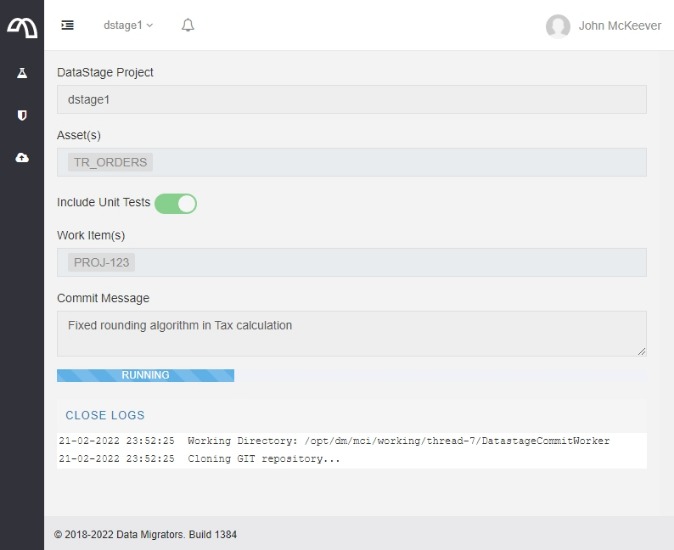
The form you’re presented with captures all the information necessary to perform your Commit to Git:
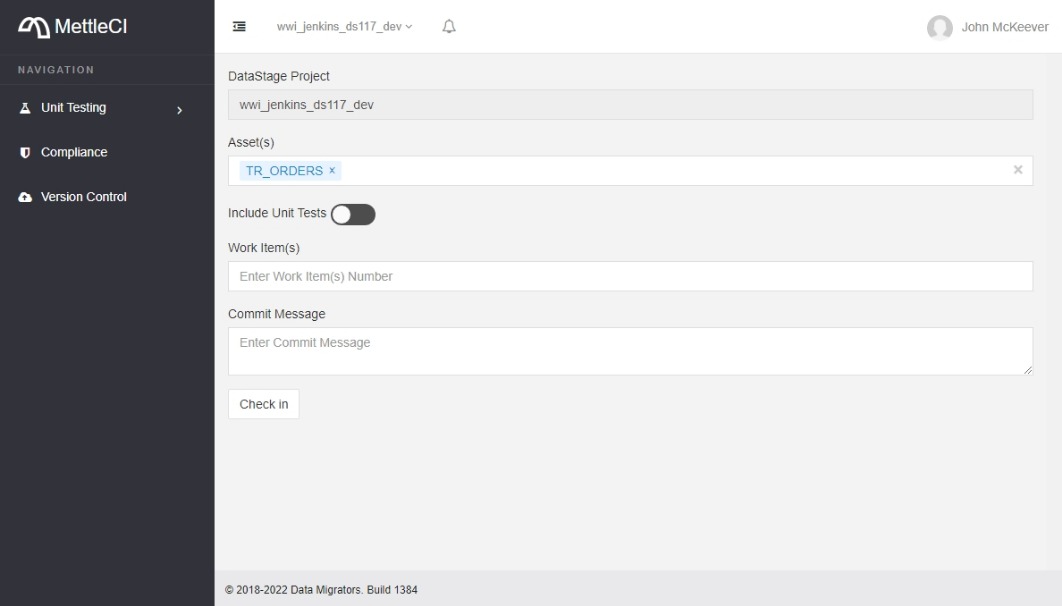
DataStage Project: This is a read-only value telling you which DataStage project you’re using (and consequently which Git repository you’re committing to)
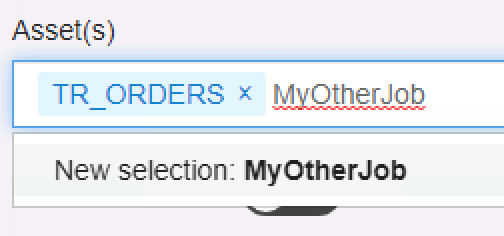
Asset(s): This is where you specify the DataStage assets you’re committing. If you invoked this page from the MettleCi DataStage Designer menu item then this field will already include the Job canvas which had focus when you selected the menu item. You can add more assets by typing their name then selecting them from the 'New selection' box which appears below (Important: Don’t forget this second step!). Even though you may specify multiple assets we generally recomment making a single commit per asset, to make tracking changes to individual assets clearer.
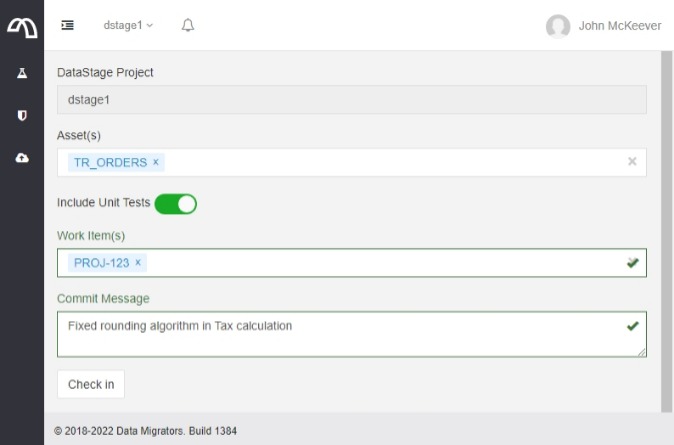
Include Unit Tests: When selected, this checkbox will include (where available) the Unit Test Specifications and Unit Test Data for all specified DataStage Job assets in the commit.
Work Item(s): Select one or more Work Items to link associate with your commit.
Commit your work
Commit Message: Enter a short comment describing your changes.
When the form is complete click Check in.
Monitor the log
When check-in completes, regardless of Pass or Fail, you can see the status using the VIEW LOGS link at the bottom of the page.
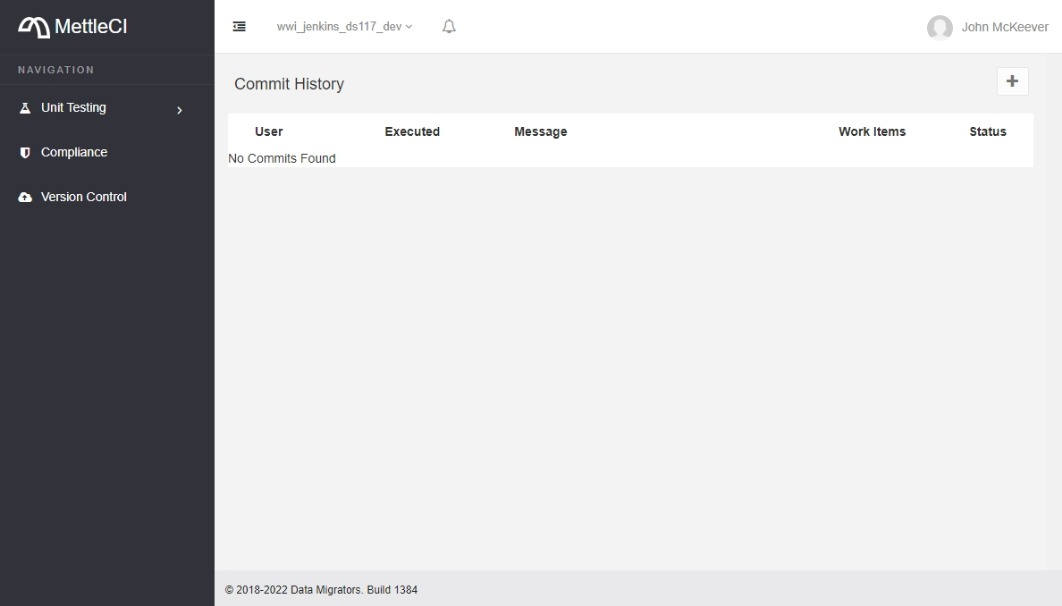
Commit History
You can also review the Commit History by clicking on Version Control from the Workbench sidebar. You can now see the success or failure history of each check in performed since the MettleCI Workbench service was started.

Related articles
- Committing DataStage Assets to Git
- Configuring Authentication between Workbench and Atlassian Bitbucket
- Workbench produces 'Failed to initialize DATASTAGE_ASB authentication' error on startup
- Workbench throws 'OutOfMemoryError'
- Executing a Unit Test
- A Workbench update doesn't appear to have installed
- Creating a Unit Test
- Unexpected DataStage error occurred - Unhandled exception Type=Segmentation error
- The MettleCI Service doesn't automatically start after a reboot
- How do we change which Browser is used for MettleCI Workbench?
- How do we re-run the Workbench Setup Wizard?
- Jira displays error about Workbench 'not registered as a Consumer' when registering application
- Creating a Unit Test
- Workbench Set-Branch Command
- Unexpected DataStage error occurred - Unhandled exception Type=Segmentation error
- How do we re-run the Workbench Setup Wizard?
- Which credentials do I use to log in to the MettleCI Workbench?
- Workbench Set-Branch Command
- A Workbench update doesn't appear to have installed
- Jira admin session timing out when setting up an App Link with Workbench
- How does MettleCI Workbench integrate with Git?
- How do we change which Browser is used for MettleCI Workbench?
- Jira admin session timing out when setting up an App Link with Workbench
- The Workbench is unreachable, or the Workbench service won't start
- Fabricating Unit Test Data
- Workbench throws 'OutOfMemoryError'
- Why do I have to install another version of Java?
- Which user account does Workbench use to commit changes in Git?
- Force Refreshing your Browser
- How does MettleCI Workbench integrate with Git?
- Workbench produces 'Failed to initialize DATASTAGE_ASB authentication' error on startup
- The MettleCI Service doesn't automatically start after a reboot
- How does the MettleCI Workbench Service work in Unix?
- Which credentials do I use to log in to the MettleCI Workbench?
- No permission to install the DataStage Designer MettleCI menu items
- Which user account does Workbench use to commit changes in Git?
- How does the MettleCI Workbench Service work in Unix?
- The Workbench is unreachable, or the Workbench service won't start
- Force Refreshing your Browser
- Why do I have to install another version of Java?
- No permission to install the DataStage Designer MettleCI menu items
- Executing a Unit Test
- Configuring Authentication between Workbench and Atlassian Bitbucket
- Why is MettleCI's Git Integration Special?
- DataStage Git Repository Structure
- How does the integration/configuration with BitBucket, Jira, and Bamboo work?
- How does MettleCI's Git functionality compare to that of Information Server v11.7?
- Why does MettleCI manage assets as ISX files?
- Azure pipeline error "You need the Git 'GenericContribute' permission"
- Can we migrate from one Git system to Another (e.g. Bitbucket to GitHub)?
- MettleCI Workbench Setup Wizard
- How does the integration/configuration with BitBucket, Jira, and Bamboo work?
- Why does MettleCI manage assets as ISX files?
- Can MettleCI manage Job parameter files in version control?
- Do we have to enable Git's LFS (Large Files Support) setting to support ISX files?
- MettleCI Integrations - Introduction
- How do we delete DataStage assets from a Git repository using MettleCI?
- What skills are required to use MettleCI on daily basis?
- Can MettleCI manage Job parameter files in version control?
- Can we migrate from one Git system to Another (e.g. Bitbucket to GitHub)?
- Shared Container image previews not available in Atlassian Bitbucket
- Configuring MettleCI Workbench to communicate with Git over HTTPS
- What skills are required to use MettleCI on daily basis?
- Configuring MettleCI Workbench to communicate with Git over HTTPS
- MettleCI Workbench Commit fails when Bitbucket Jira issue commit checker is enabled
- Git and MettleCI
- Shared Container image previews not available in Atlassian Bitbucket
- MettleCI Integrations
- Do we have to enable Git's LFS (Large Files Support) setting to support ISX files?
- Development Model Options & Recommendations
- How do we delete DataStage assets from a Git repository using MettleCI?
- Azure pipeline error "You need the Git 'GenericContribute' permission"
- Jira issues aren't showing relevant Git commits made via MettleCI
- Configuring MettleCI Workbench to access systems via an HTTP/S proxy
- Git and MettleCI
- Configuring MettleCI Workbench to access systems via an HTTP/S proxy
- Does MettleCI only handle DataStage testing and deployment, or does it also handle IGC and IA?
- GitHub
- GitHub
- Filename too Long error during Git operations
- How does MettleCI's Git functionality compare to that of Information Server v11.7?
- MettleCI Workbench Commit fails when Bitbucket Jira issue commit checker is enabled
- MettleCI Workbench Setup Wizard
- Development Model Options & Recommendations
- Filename too Long error during Git operations
- Jira issues aren't showing relevant Git commits made via MettleCI
- Does MettleCI only handle DataStage testing and deployment, or does it also handle IGC and IA?