
MettleCI's Check-In Plans page is for linking DataStage project with a Check-in plan on the bamboo server. Every time user performs check-in, bamboo will automatically run the specified plan with provided parameters to commit the changes.
This administration page is available after installing the MettleCI - Git Plugin (dm-git-plugin<version>.jar)
To add new Check-in Plan
Steps
-
Navigate to Bamboo Administration page.
-
Click on Check-in Plans under Mettle section on the left panel.
-
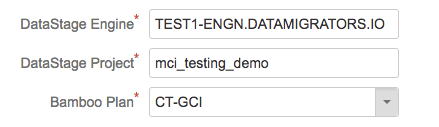
Click Add Checkin Plan button and fill in the values
DataStage Engine
<Datastage Engine Name>
DataStage Project
<Datastage Project Name>
Bamboo Plan
<Bamboo Plan>
Select check-in plan that you have setup
-
Click Create