
MettleCI's powerful Unit Test capability allows developer to conduct unit testing using authored, intercepted, or fabricated data without having to alter your DataStage job design. Unit Tests are created, maintained, and monitored using the MettleCI Workbench. Unit Tests are executed using the Windows-based DataStage Designer or browser-based DataStage Flow Designer.
In order to use the Unit Test Feature, you'll need to
-
add 1 User Defined Environment Variable
-
add that environment variable as a parameter to each job for which you want to run unit tests
Step-by-step Guide
1. Fabricate Data for Input Source
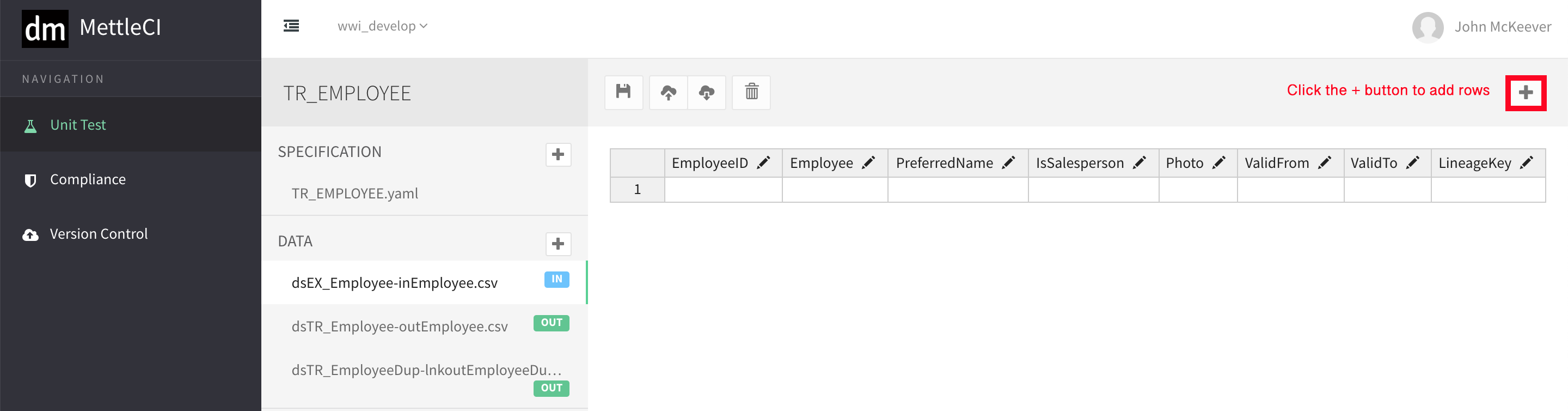
Click on the ID data source, followed by the + button on the top right hand corner to determine the number of rows of data to fabricate
2. Save Fabricated Input Source
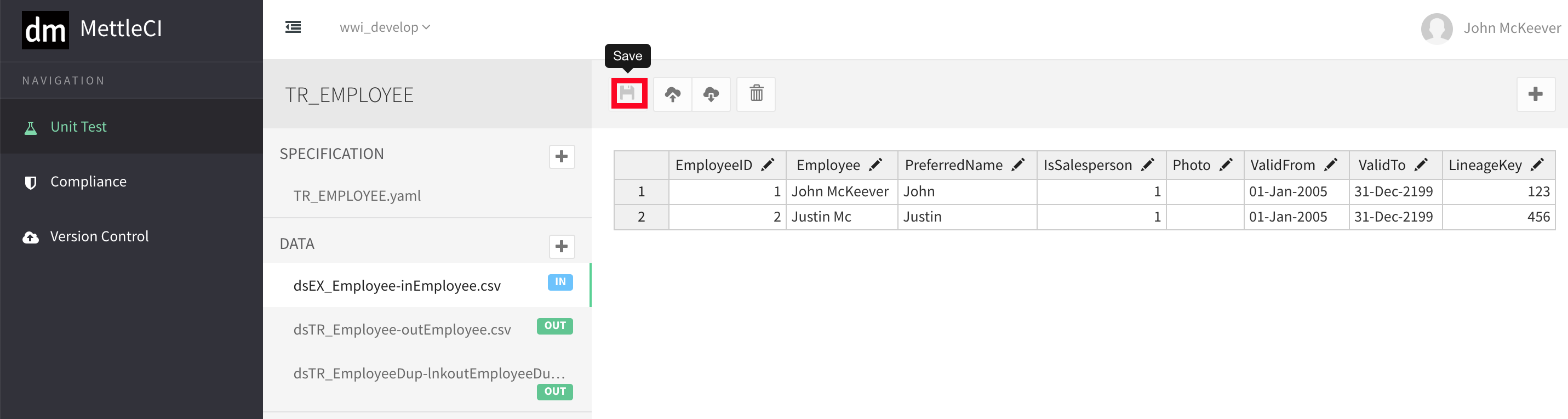
Remember to click on the Save button after preparing the source data
3. Output Data
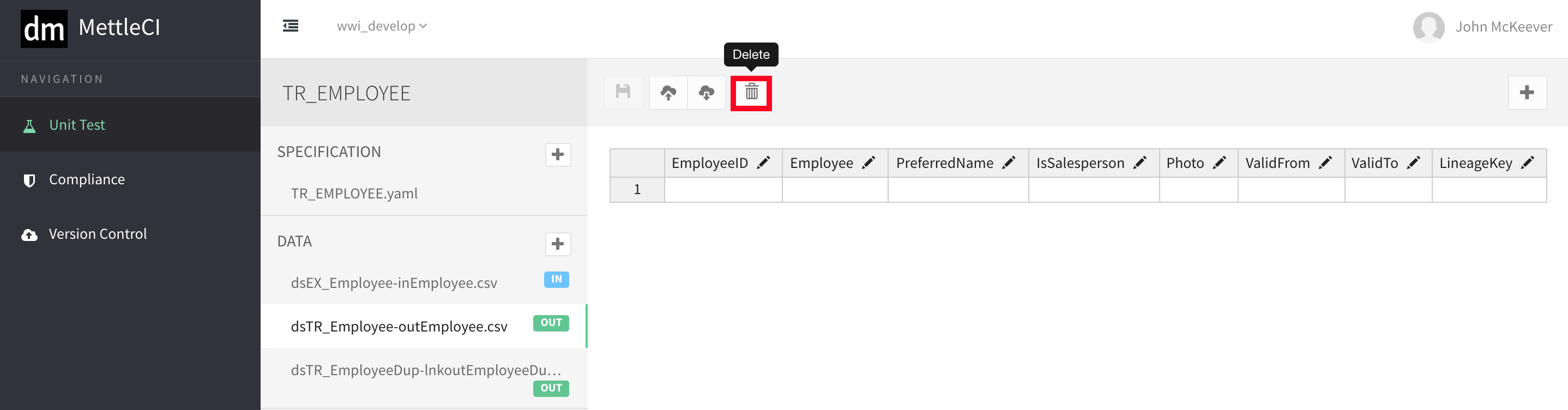
If you know what the output is going to look like, you can enter it. Unit Testing will run the job and compare the actual output with the assumed output. It will report on any mismatch. On the other hand, if do not know what the output is going to look like, simply delete them by clicking on the Trash button.
7. Run DataStage Job in Unit Testing Mode
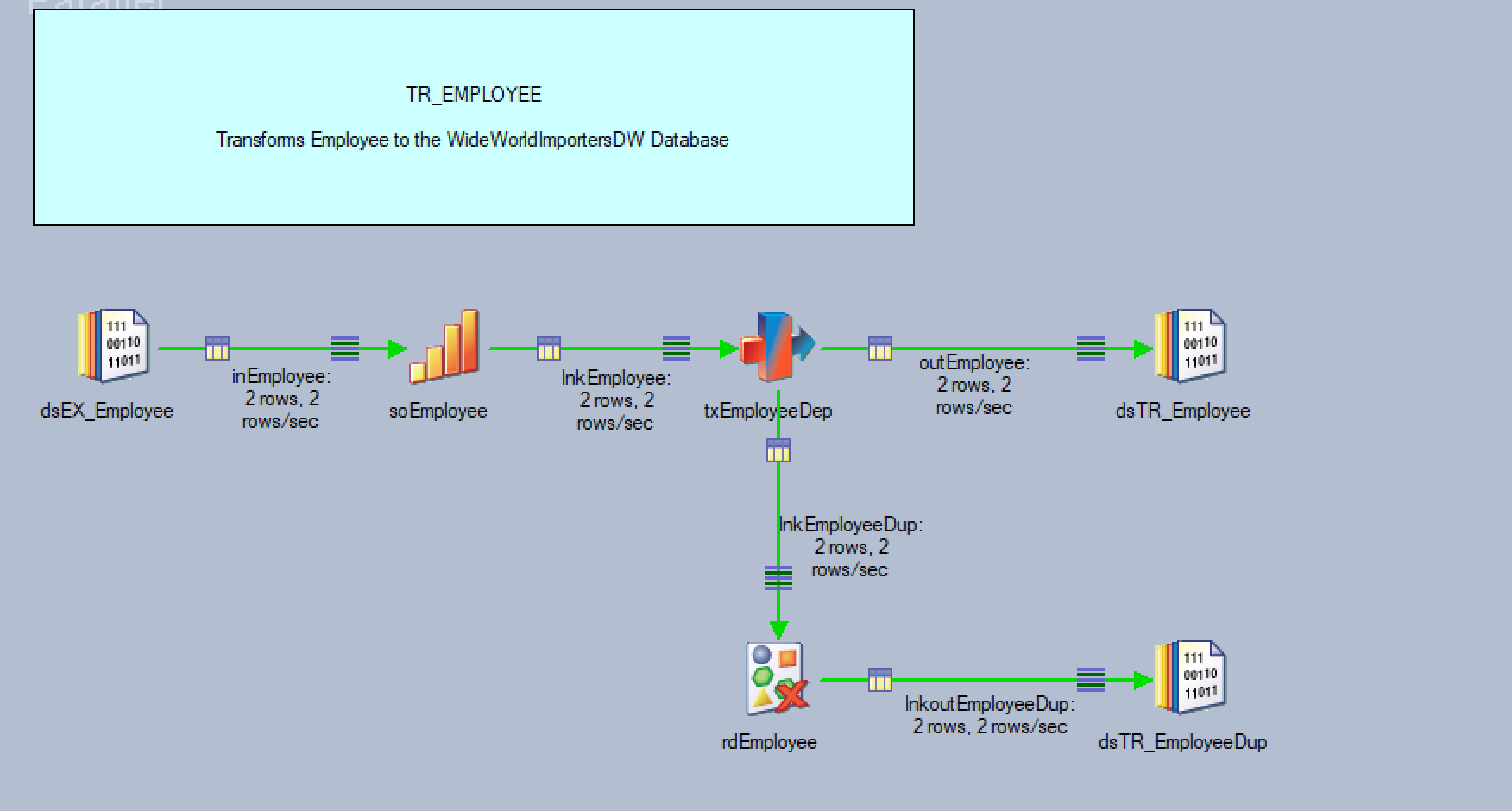
Run your DataStage Job in Unit Testing Mode by Enabled the pUnitTesting option
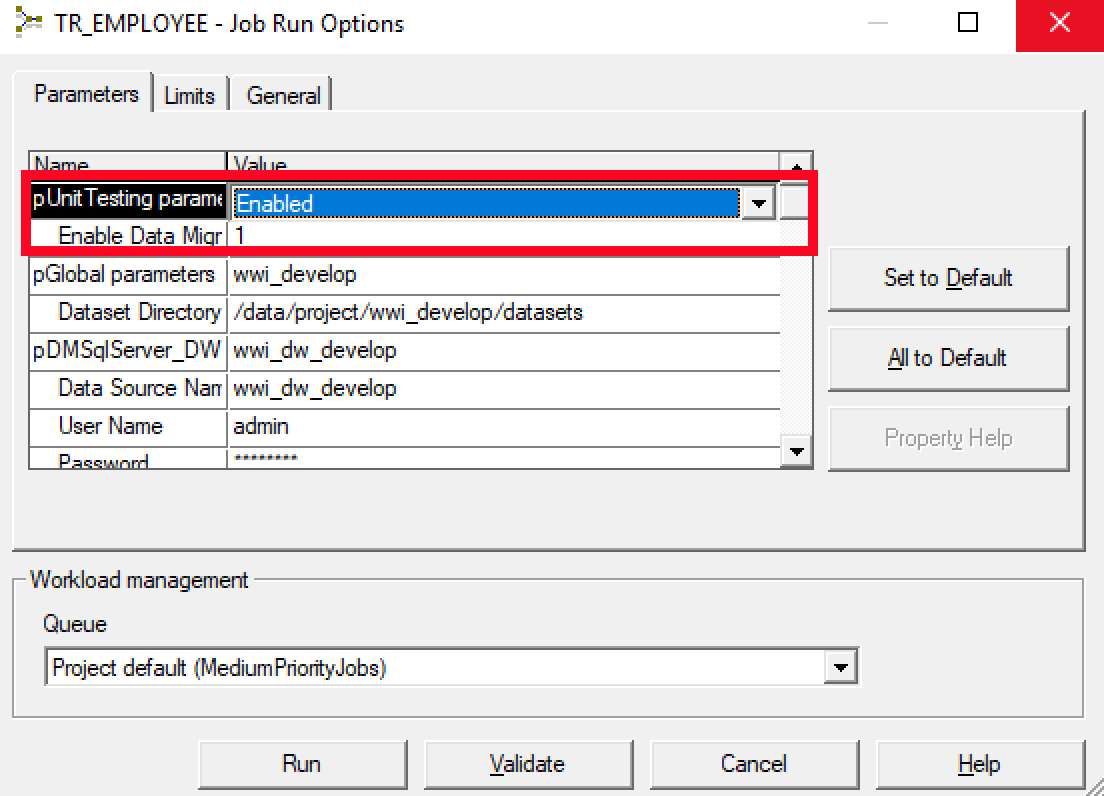
You'll be able to see dataStage job will now use the 2 fabricated rows for unit testing
8. Check Unit Tests List
Navigate back to Unit Tests List from the sidebar. You can now see Unit Test for ER_EMPLOYEE created.
Due to the fact that we did not specify an output for comparison. The result is in RED colour.

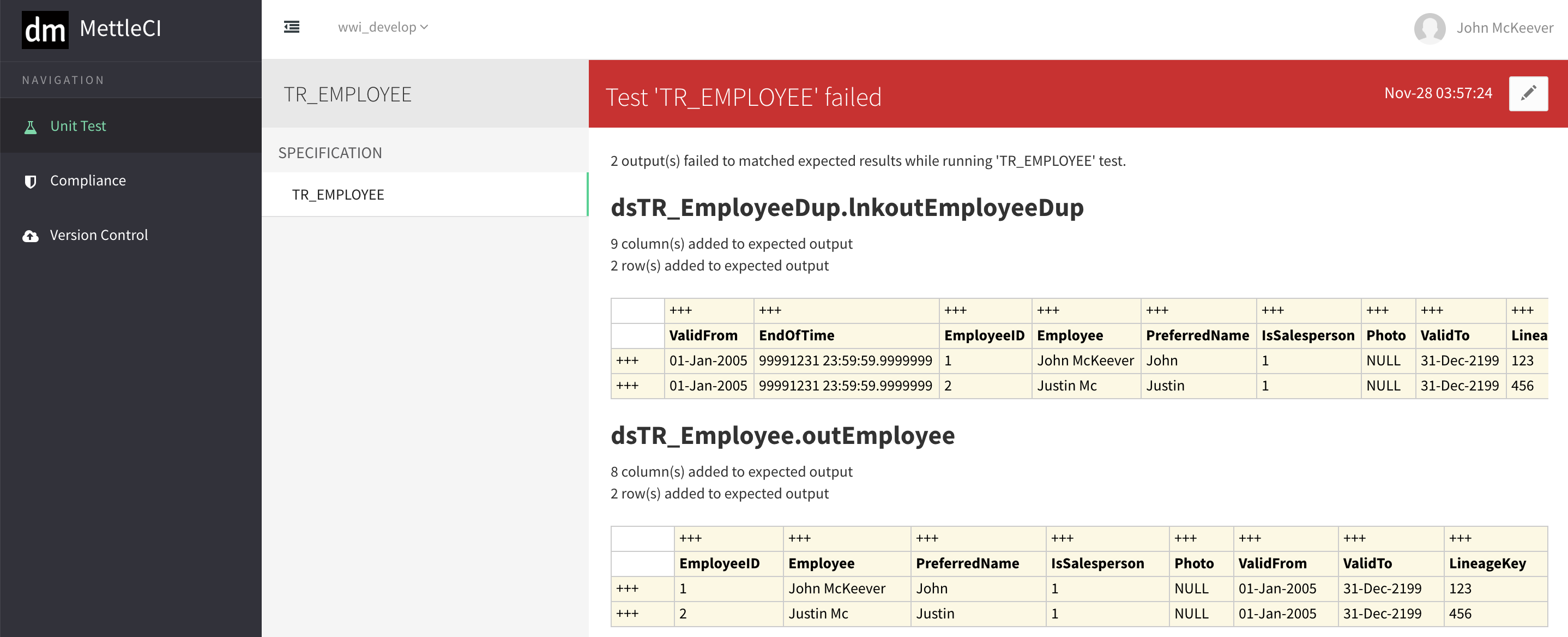
9. Output mismatch report
By clicking on the RED view result button above, it will bring you a summary report of the Unit Test
10. Baseline Output Data
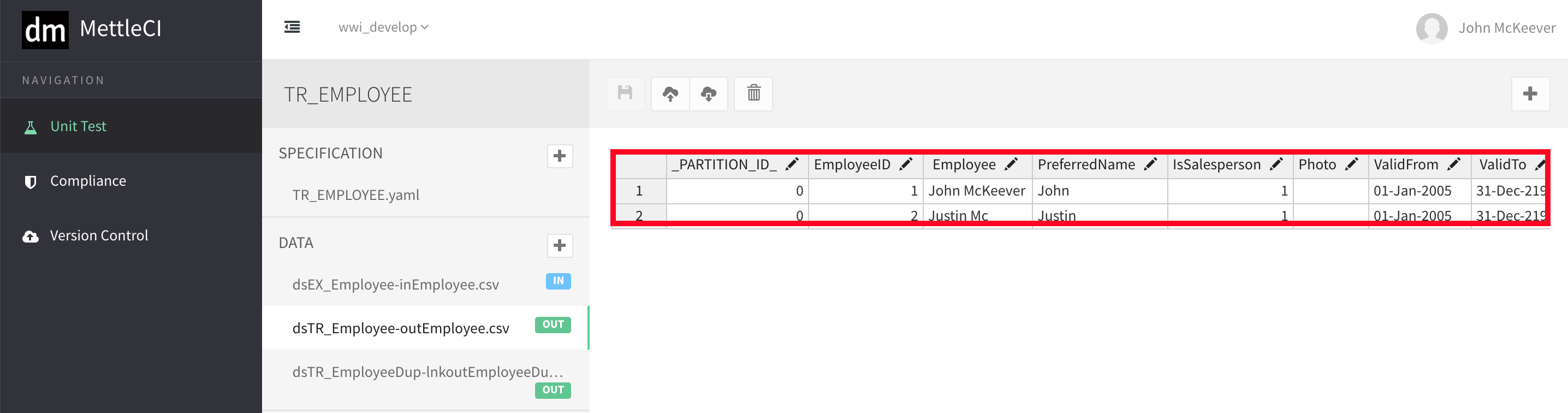
If we go back to Unit Test Setting for TR_EMPLOYEE, we can now see the output of the first run is now set at the baseline of the output
11. Rerun Unit Test
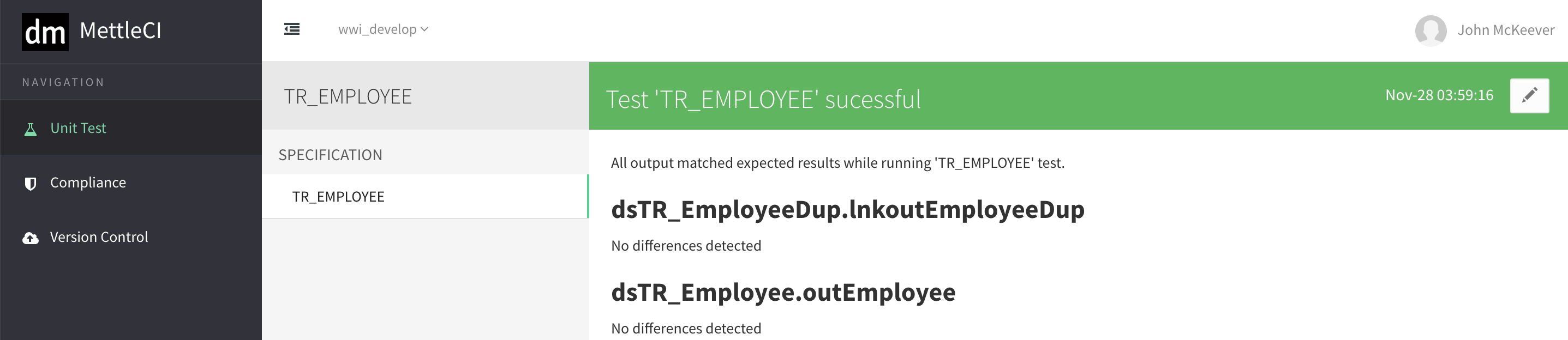
If we rerun the Unit Test again, the test summary report will produce a report of perfect matched output.
Related articles
- Configuring Authentication between Workbench and Atlassian Bitbucket
- Workbench produces 'Failed to initialize DATASTAGE_ASB authentication' error on startup
- Workbench throws 'OutOfMemoryError'
- Executing a Unit Test
- A Workbench update doesn't appear to have installed
- Creating a Unit Test
- Unexpected DataStage error occurred - Unhandled exception Type=Segmentation error
- The MettleCI Service doesn't automatically start after a reboot
- How do we change which Browser is used for MettleCI Workbench?
- How do we re-run the Workbench Setup Wizard?
- Jira displays error about Workbench 'not registered as a Consumer' when registering application
- Creating a Unit Test
- Workbench Set-Branch Command
- Unexpected DataStage error occurred - Unhandled exception Type=Segmentation error
- How do we re-run the Workbench Setup Wizard?
- Which credentials do I use to log in to the MettleCI Workbench?
- Workbench Set-Branch Command
- A Workbench update doesn't appear to have installed
- Jira admin session timing out when setting up an App Link with Workbench
- How does MettleCI Workbench integrate with Git?
- How do we change which Browser is used for MettleCI Workbench?
- Jira admin session timing out when setting up an App Link with Workbench
- The Workbench is unreachable, or the Workbench service won't start
- Fabricating Unit Test Data
- Workbench throws 'OutOfMemoryError'
- Why do I have to install another version of Java?
- Which user account does Workbench use to commit changes in Git?
- Force Refreshing your Browser
- How does MettleCI Workbench integrate with Git?
- Workbench produces 'Failed to initialize DATASTAGE_ASB authentication' error on startup
- The MettleCI Service doesn't automatically start after a reboot
- How does the MettleCI Workbench Service work in Unix?
- Which credentials do I use to log in to the MettleCI Workbench?
- Committing DataStage Assets to Git
- No permission to install the DataStage Designer MettleCI menu items
- Which user account does Workbench use to commit changes in Git?
- How does the MettleCI Workbench Service work in Unix?
- The Workbench is unreachable, or the Workbench service won't start
- Force Refreshing your Browser
- Why do I have to install another version of Java?
- No permission to install the DataStage Designer MettleCI menu items
- Executing a Unit Test
- Configuring Authentication between Workbench and Atlassian Bitbucket
- Committing DataStage Assets to Git
- SSLHandshakeException in Workbench after configuring issue lookup
- Bamboo Run DataStage Unit Tests Task
- Bamboo DataStage Capability
- Bamboo Compile DataStage Project Task
- Will installing Java v1.8 break my DataStage environment?
- Workbench login error 'The URL is incorrect or is not trusted'
- Bamboo Compile DataStage Project Task
- Bamboo Incremental Deployment Task
- Bamboo DataStage Capability
- The `mettleci datastage create-project` command fails
- Bamboo Properties Configuration Task
- Will installing Java v1.8 break my DataStage environment?
- Bamboo Properties Configuration Task
- SSLHandshakeException in Workbench after configuring issue lookup
- Bamboo Run DataStage Unit Tests Task
- The `mettleci datastage create-project` command fails
- Bamboo Incremental Deployment Task
- Workbench login error 'The URL is incorrect or is not trusted'