
Problem
Enabling https in Gitlab fails when performing gitlab-ctl reconfigure and an error message is generated similar to the following:
There was an error running gitlab-ctl reconfigure:
letsencrypt_certificate[gitlab.your-org.com] (letsencrypt::http_authorization line 6) had an error: RuntimeError: acme_certificate[staging]
(<SNIP>/letsencrypt/resources/certificate.rb line 41) had an error: RuntimeError: ruby_block[create certificate for gitlab.your-org.com]
(<SNIP>/acme/resources/certificate.rb line 108) had an error: RuntimeError: [gitlab.your-org.com] Validation failed, unable to request certificate,
Errors: [{url: https://acme-staging-v02.api.letsencrypt.org/acme/chall-v3/1867988668/77NCww, status: invalid,
  error: {
    "type"=>"urn:ietf:params:acme:error:connection",
    "detail"=>"Fetching http://gitlab.your-org.com/.well-known/acme-challenge/<SNIP>: Connection refused",
    "status"=>400}
    }
]
Cause
Let’s Encrypt provides free Certificate Authority-signed Certificates valid for 90 days, but needs to verify that your website is accessible via the Fully Qualified Domain Name (FQDN). Gitlab does this by placing a small text file in a sub-directory of the Nginx web server and then tries to access it over the internet.
Typical Issues that occur with this process are:
-
The DNS entries for the Gitlab server are not configured correctly
-
The Gitlab server is not accessible over Port 80 and 443 due to firewall configuration
-
There are incorrect settings in the file
/etc/gitlab/gitlab.rb -
There are incorrect permissions on the directory
/var/opt/gitlab/nginxor one of its sub-directories
Diagnosis
-
Place a small text file under
/var/opt/gitlab/nginx/www/.well-known/acme-challenge/-
E.g.
echo "MettleCI is magic!" > /var/opt/gitlab/nginx/www/.well-known/acme-challenge/example.txt
-
-
Try accessing this file from an external device that does not have any special privileges (e.g. with a Phone using Mobile Data connection) by accessing
http://gitlab-fqdn.example.com/.well-known/acme-challenge/example.txt -
If this isn’t successful investigate potential DNS or firewall issues, depending on whether you receive an error telling you the site is unknown (DNS) or file is not accessible (firewall).
-
Run a test using ‘Let’s Debug' using the default
HTTP-01mode.
Solution
-
Temporarily open global access to ports 80 and 443
-
In
/etc/gitlab/gitlab.rb, uncomment (remove any leading #s) and set the appropriate values for the following settings:-external_url "https://gitlab-fqdn.example.com" nginx['redirect_http_to_https'] = true nginx['redirect_http_to_https_port'] = 80 letsencrypt['enable'] = true letsencrypt['contact_emails'] = ['admin@example.com'] # This should be an array of email addresses to add as contacts letsencrypt['group'] = 'root' letsencrypt['key_size'] = 2048 letsencrypt['owner'] = 'root' letsencrypt['wwwroot'] = '/var/opt/gitlab/nginx/www' # Note: Auto-renew left set to false # since we restrict Global Port 80 and 443 Access letsencrypt['auto_renew'] = false -
Made sure the permissions on the directory
/var/opt/gitlab/nginxare recursively set to770: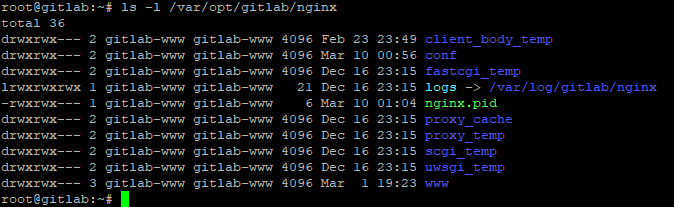
-
Ensure user uploads (like ACME challenge) are accessible:
$> usermod -aG gitlab-www www-data
-
Restart Gitlab
$> gitlab-ctl reconfigure
$> gitlab-ctl restart
-
Access
https://gitlab-fqdn.example.comfrom a Browser and check that Certificate errors are not encountered -
Revoke global access to ports 80 and 443