
Assumptions
This page provides an illustrated walk through of the installation and configuration of MettleCI’s components on a simple DataStage v11.7 topology using a Unix Engine tier. It is geared towards users who have seen the MettleCI demo video and have some understanding of how the following functions are accessed and used…
-
MettleCI Workbench (including DataStage Designer menus)
-
MettleCI Compliance
-
MettleCI Unit testing
-
MettleCI Git Commit (including Work Item lookup)
Contents
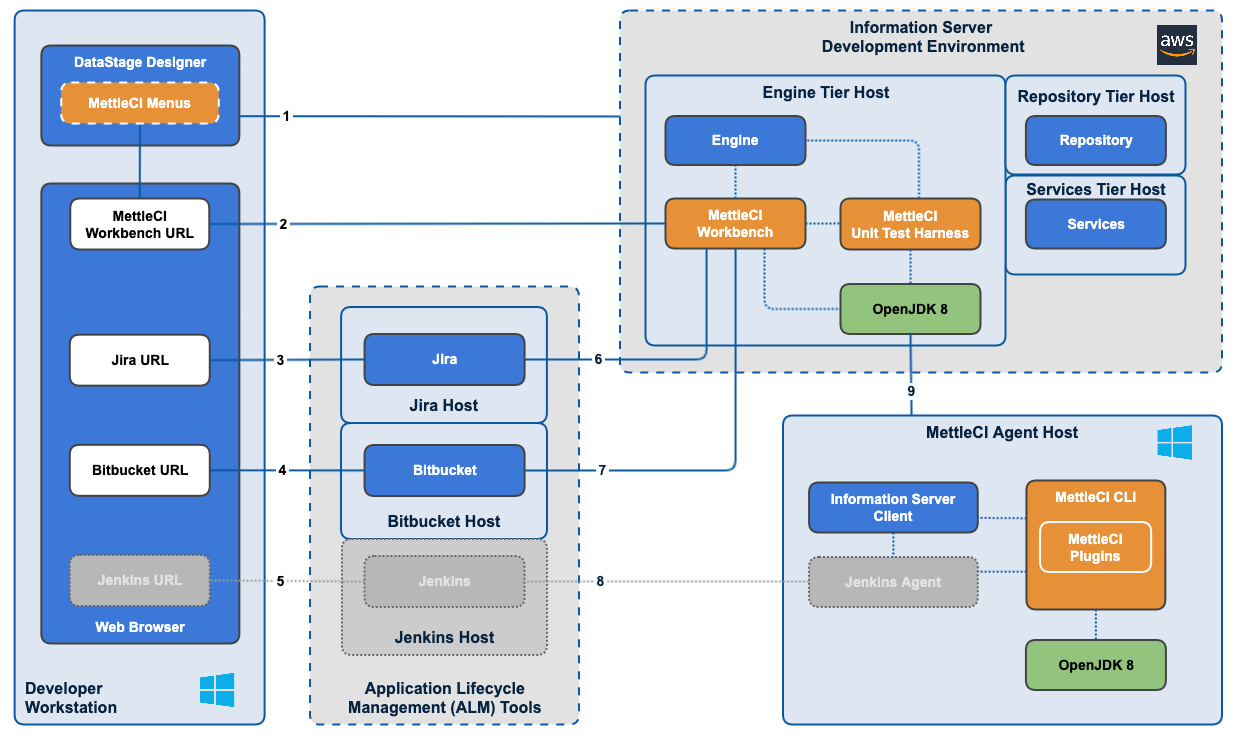
Topology
Introduction and Prerequisites
-
Support resources
-
Scope
-
Introduce installation demo environment
-
Acquiring MettleCI download assets
-
Introducing the MettleCI download assets
-
Data Migrators Customers
-
IBM Customers (link)
-
-
Install OpenJDK v8 (non-IBM JVM) (link)
-
On the DataStage Engine (for MettleCI Workbench)
-
On the Agent Host (for MettleCI CLI)
-
WINDOWS Using
.msiinstaller (not demonstrated) -
UNix Using package manager(e.g.,
yum)
-
Running time: 17m 00s
Install MettleCI Workbench
-
Install Workbench Service
-
WINDOWS Using
.msiwithin.zipfile (not demonstrated) -
UNix Using
.rpmfile
-
-
Deploy
mettleci.liclicense file-
Rename from
license.txt
-
-
HTTPS Configuration (link)
-
Generate Java KeyStore
-
Update
config.ymlto addServersection, then restart Workbench service -
Add certificate to Windows client and restart browser
-
Running time: 19m 17s
Deploy Git Repositories and Register Workbench Project
-
DataStage & Compliance Repositories
-
Create remote repository
-
Extract supplied repository template locally
-
-
Configure Authentication to Remote Repository
-
Register workbench.key.pub against Git repository
-
-
Populate Remote Repositories
-
Associate local repository with remote repository
-
Synchronize with git add, git commit, and git push
-
-
Repeat for Compliance Repository
-
Create Remote, Create Local, Authenticate, Push
-
-
Test Workbench Access to Git Repositories
-
MettleCI Compliance fetches from the Compliance repository
-
MettleCI Commit pushes to the DataStage repository
-
Running time: 19m 28s
DataStage Designer Menus
Running time: 3m 31s
Define Work Item Management System
-
Authentication to Jira (link)
-
Generation of
.pcks8and.pemfiles for Workbench and Jira -
Creating a Jira Application Link to Workbench
-
-
Define a Jira Work Item Management System in Workbench
-
Associate our Jira Project with our DataStage Project in Workbench
-
Test Work Item lookup using the Workbench Commit page
COMING SOON!
Install Unit Test Harness
-
Install Parallel Test Harness
-
WINDOWS Using
.exefile (not demonstrated) -
UNix Using
.rpmfile
-
-
Add
$DM_ENABLE_UNIT_TESTINGenvironment variable to DSParams-
For demo project + template DSParams for future projects
-
-
Test Parallel Test Harness
-
Interception
-
Test
-
COMING SOON!
Onboarding a DataStage Project into Git
-
Use
git pullto align your local Git repository with the remote repository -
Export your DataStage project to the local Git repository
-
Use
mettleci isx cutto separate it into individual assets -
git add,git commit, andgit pushto get all your assets into Git
COMING SOON!