
When defining data fabrication options in the unit test data editor MettleCI provides a set of tools, described below, which enable the fabrication of authentic-looking data for unit testing purposes.
Built-in Generators
MettleCI provides a set of basic data generators for the fabrication of common data items across a range of applications. The generators are grouped into ‘categories’, of which the principle ones are summarised below.
|
Built-in category |
Type of generators |
|---|---|
|
Address |
Country-specific addresses of different formats |
|
Business |
Business names, types, and identifying codes |
|
Energy & Utilities |
Data and standardised codes used in the energy and utilities industries |
|
Finance |
Various banking identifiers including those for credit card information |
|
Health |
Data and standardised codes used in the healthcare industry |
|
Location |
Non-address geographical location and time zone information |
|
Miscellaneous |
Data generators not easily fitting into any other category |
|
Person |
Names and other PII related to individuals |
|
Technical |
Computer-related generators, including those for file and networking data |
Note that some of these generators offer context-sensitive parameters, some of which are mandatory. Where one or more parameters are mandatory then the column editor panel on the right of the screen will not permit you to save your settings (and hence close the panel) until the mandatory parameter(s) have been supplied.
Utility → Null
The default data generator assigned to all columns until altered by a user. Not that this generator is assigned regardless of the nullable status of the column, and so non-nullable column will be flagged with a data validation error until supplied with valid data.
Utility → Reference
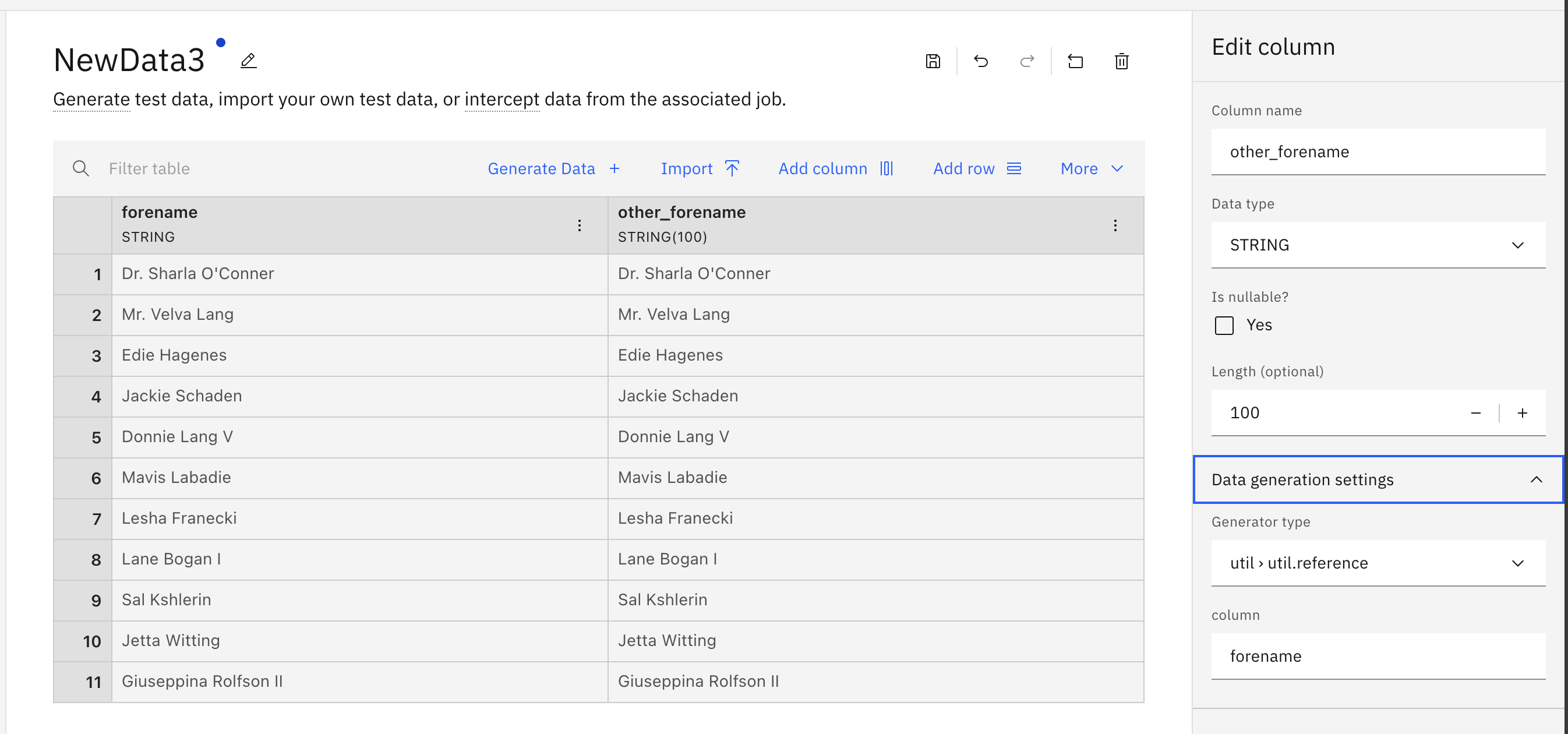
This tool enables you to make a verbatim copy of a value from another cell on the same row by providing a reference to the source column. Note that no further modification of the source value is possible. If you wish to modify the source value or incorporate it as part of a more complex expression then use the Utility → Custom Expression generator (link).
Utility → Regex
This tool enables you to generate data which matches a supplied regular expression - the opposite of what many users are accustomed to using regular expressions for! This is how some of MettleCI’s built-in data generators (see below) are constructed. e.g.
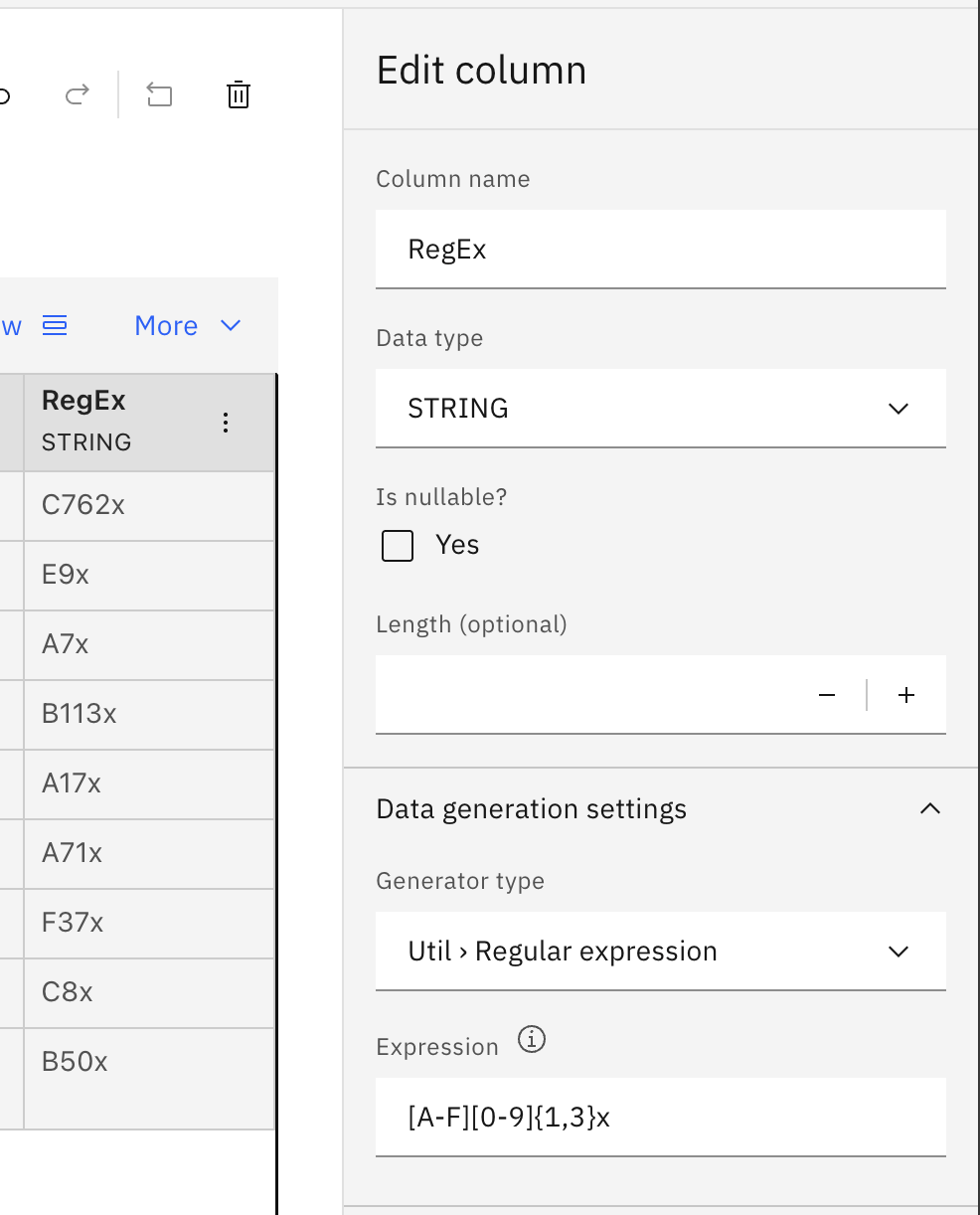
The data fabrication Regex tool uses Google’s Re2 library which supports a subset of Regular Expression syntax. A full description of the supported syntax can be found on Google's re2 wiki page. A link from that page also provides a more detailed exploration of the tool's caveats.
Utility → Custom Expression
A Custom Expression enables you to generate fabricated data using the same DataStage expression format you’re accustomed to using in DataStage Transformer stages. This can be particularly useful when wanting to generate fabricated data based on the current date or time, or when wanting to employ randomness, complex mathematical functions, or complex string manipulation.
Note that MettleCI Data Fabrication will automatically coerce data types, so the use of DataStage’s data type conversion functions is rendered mostly redundant. For this reason, you may find that some DataStage data type conversion functions are not supported in data fabrication custom expressions.
In addition to DataStage functions your custom expressions can also use some data fabrication-specific capabilities:
-
The
regex(regular_expression)function invokes the same capability as the ‘Regex' option described above, and -
You may make a reference to a value in another cell on the same row using the
row.{column_name}syntax.
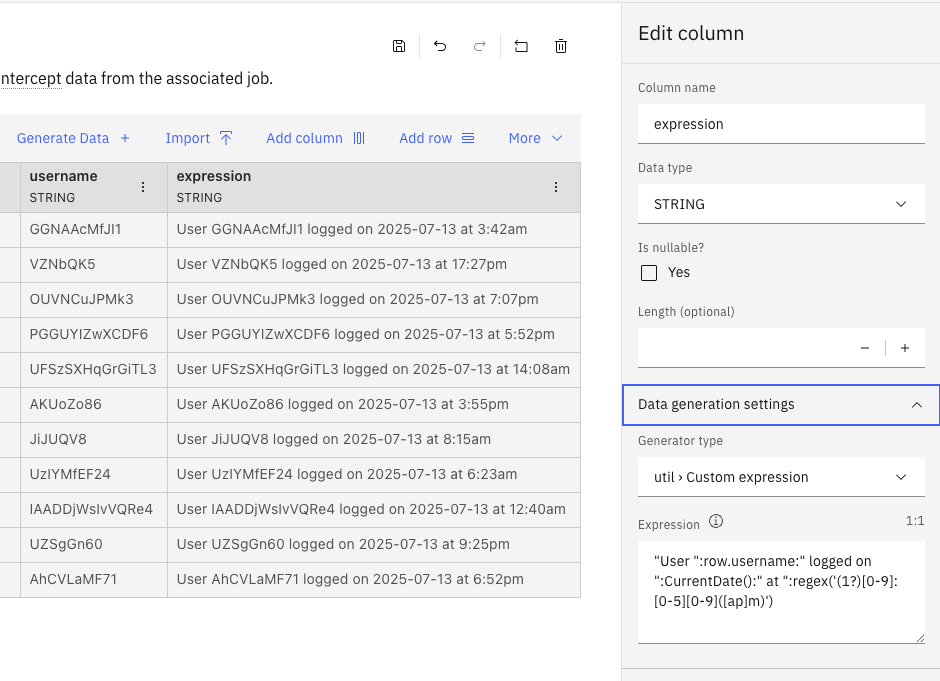
The example below uses a combination of the DataStage CurrentData() function, the DataStage concatenation operator (:), a column reference (row.username) and a regex call.
"User ":row.username:" logged on ":CurrentDate():" at ":regex('(1?)[0-9]:[0-5][0-9]([ap]m)')
Note that custom expressions may not make reference to other generators, whether built-in or custom.
Custom Generators
User defined data generators to meet organisation-, industry-, or team-specific data fabrication requirements. See Creating Custom Data Fabricators for more information on creating your own data generators.